Frame Limiters Benchmarked: Real-Life Frame Pacing Comparison
Almost every PC gamer caps their framerate to stop screen tearing, stabilize GPU temperatures, or eliminate stutters. But does the tool you use to limit your frames actually make your game smooth?
To find out, we benchmarked In-Game limiter, the NVIDIA App Driver Limiter, RTSS (RivaTuner), Special K, and framepacer. The results reveal why two tools showing the exact same average FPS can feel completely different on your screen.
Why "60 FPS" Can Still Feel Stuttery
Most players evaluate performance using a simple in-game FPS counter. If the counter reads "60", they assume the game is running smoothly.
However, the FPS counter only counts how many total pictures your PC made during a full one-second window. It tells you nothing about when those frames arrived.
- Perfect Frame Pacing (Smooth): At 60 FPS, exactly one frame arrives every 16.67 milliseconds like clockwork. Motion looks fluid and responsive.
- Uneven Frame Pacing (Stutter): One frame arrives in 4ms, the next takes 30ms, and another takes 8ms. You still got 60 frames in that second, but the irregular rhythm creates noticeable stutter.
Test Methodology & Benchmark Setup
Accurate benchmarking requires an independent referee. External frame limiters work by hooking into the game's rendering pipeline. If you rely on a limiter's own built-in overlay to measure performance, it only sees frame delivery from its own internal perspective, which will be biased and hide stutters that happen further down the display line.
Furthermore, running multiple limiting tools at the same time causes them to compete on the exact same hook chain, interfering with each other’s timing and distorting benchmark results.
To ensure 100% fair, accurate, and unbiased results:
- Unbiased External Capture: We used CapFrameX (ETW-based) analyzing
MsDisplayBetweenFrames. Instead of hooking inside the game or merely measuring when the engine renders a frame, this tracks the exact millisecond duration each frame physically stays on your display. - One Limiter at a Time: Every frame limiter was tested strictly in isolation.
- Clean Game Restarts: The game was fully closed and restarted after every single test run to guarantee no residual hooks, injected DLLs, or memory conflicts remained.
PRAGMATA
NVIDIA GeForce RTX 4060 Laptop GPU on Windows 11. 3 aggregated 20-second repeatable runs per limiter.
1% & 0.2% Lows
Measures the worst dips in frame rate. The closer the 0.2% low is to your target, the smoother the experience.
Frame Jitter (< 2ms)
Calculates time difference between consecutive frames. Ideally 100% of frames differ by less than 2ms.
We evaluated 6 different frame limiting configurations across 3 key targets (30 FPS, 60 FPS, and 61 FPS):
- In-Game Limiter: The built-in framerate limiter inside the game engine settings.
- Driver-Based Limiter (NVIDIA App / NVCP): The global "Max Frame Rate" cap configured in GPU driver software.
- RTSS Async: The default asynchronous limiter mode in RivaTuner Statistics Server.
- RTSS Front Edge (AW - Active Wait): RivaTuner's spin-wait limiter.
- RTSS Front Edge (PW - Passive Wait): RivaTuner's sleep-wait limiter.
- Special K (Normal): Special K's normal limiter.
- framepacer v0.4: framepacer's limiter.
Test 1: 30 FPS - The Console Stability Test
At a 30 FPS target, each frame must stay on screen for exactly 33.33 milliseconds. This test demonstrates how each limiter handles heavy single-player pacing where consistency is critical.
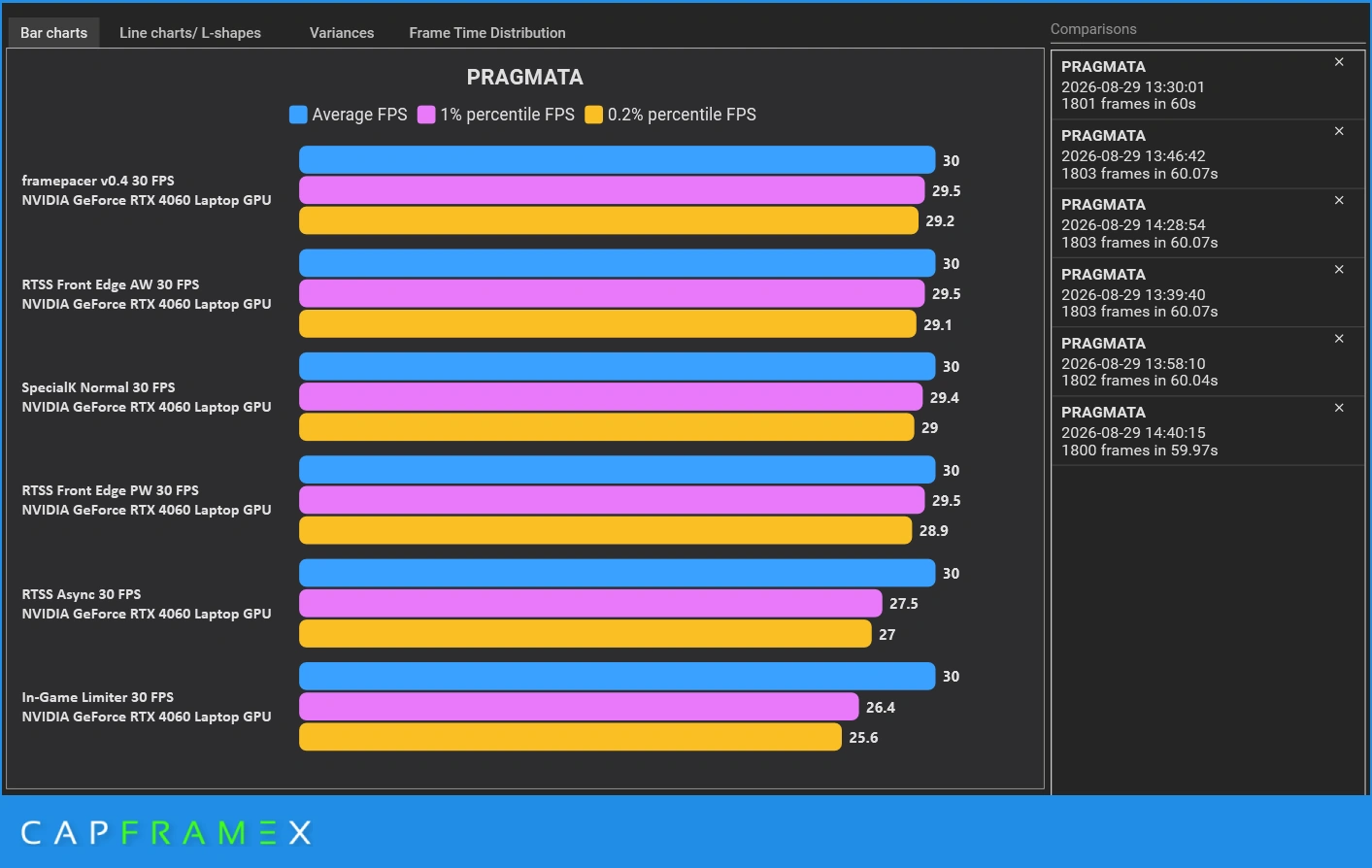
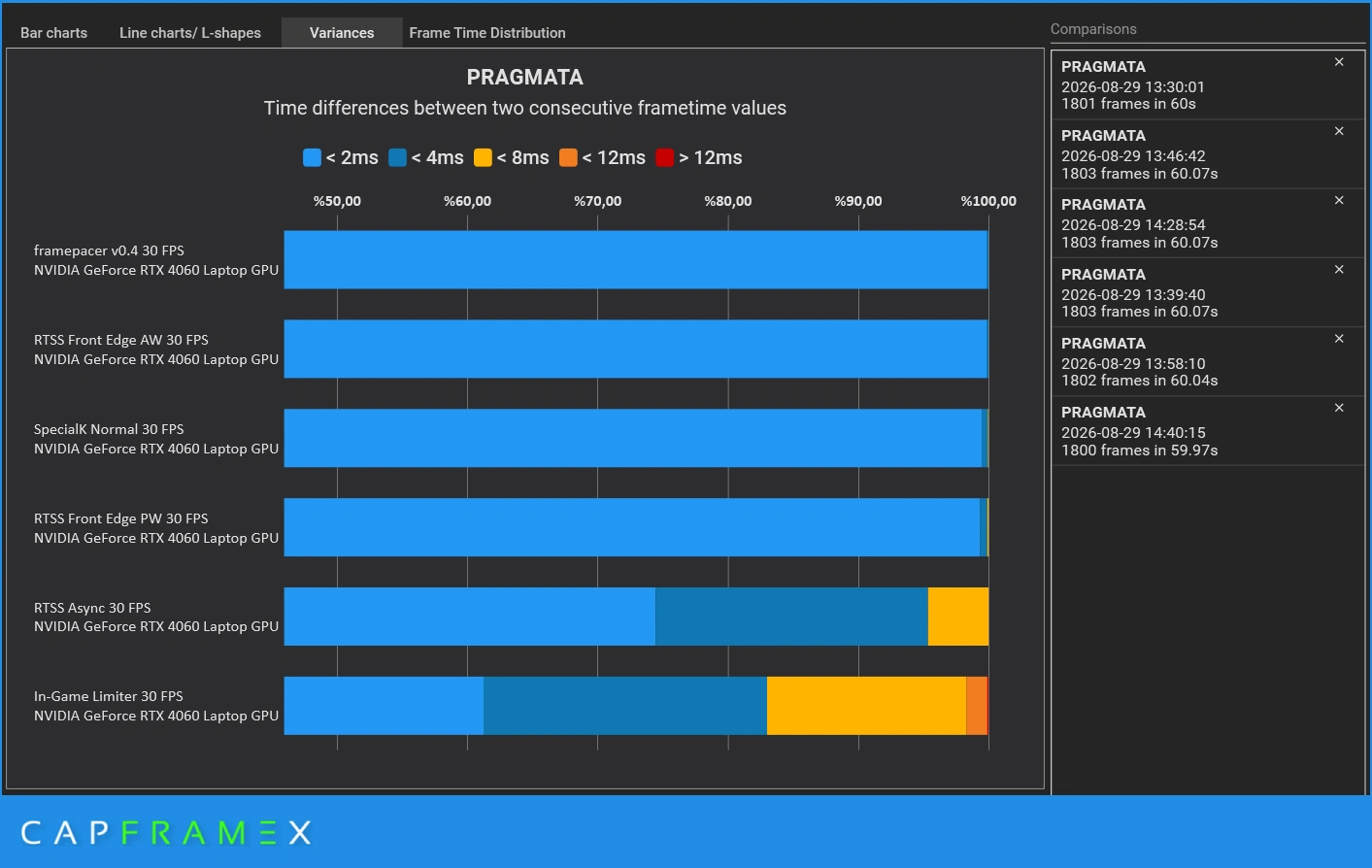
30 FPS Benchmark Results
| Limiter Method | Average FPS | 1% Low | 0.2% Low | Frames < 2ms Variance |
|---|---|---|---|---|
| framepacer v0.4 | 30.0 | 29.5 | 29.2 | 99.9% |
| RTSS Front Edge (AW) | 30.0 | 29.5 | 29.1 | 99.8% |
| Special K (Normal) | 30.0 | 29.4 | 29.0 | 99.0% |
| RTSS Front Edge (PW) | 30.0 | 29.5 | 28.9 | 99.0% |
| RTSS Async | 30.0 | 27.5 | 27.0 | 73.0% |
| In-Game Limiter | 30.0 | 26.4 | 25.6 | 61.0% |
Analysis & Findings
The data clearly separates the tools into two distinct tiers:
- High Precision Tier (framepacer, RTSS Front Edge, Special K): These tools delivered a practically flawless 99.8% to 99.9% consistency rate. Consecutive frames stayed within 2ms of the 33.33ms target. The 0.2% lows stayed above 29 FPS, delivering the smooth feel typically associated with dedicated game consoles.
- Fluctuating Tier (In-Game & RTSS Async): The in-game limiter struggled significantly. Almost 40% of its frames had timing errors greater than 2ms, with some frames jumping by more than 8ms to 12ms. This variance dragged 0.2% lows down to 25.6 FPS, causing visible hitching despite a solid 30 FPS average.
Test 2: 60 FPS - The Standard PC Gaming Test
At 60 FPS, the target frametime drops to 16.67 milliseconds. Because the timing window is cut in half, any delay or inaccuracy in the limiter becomes twice as noticeable to your eyes.
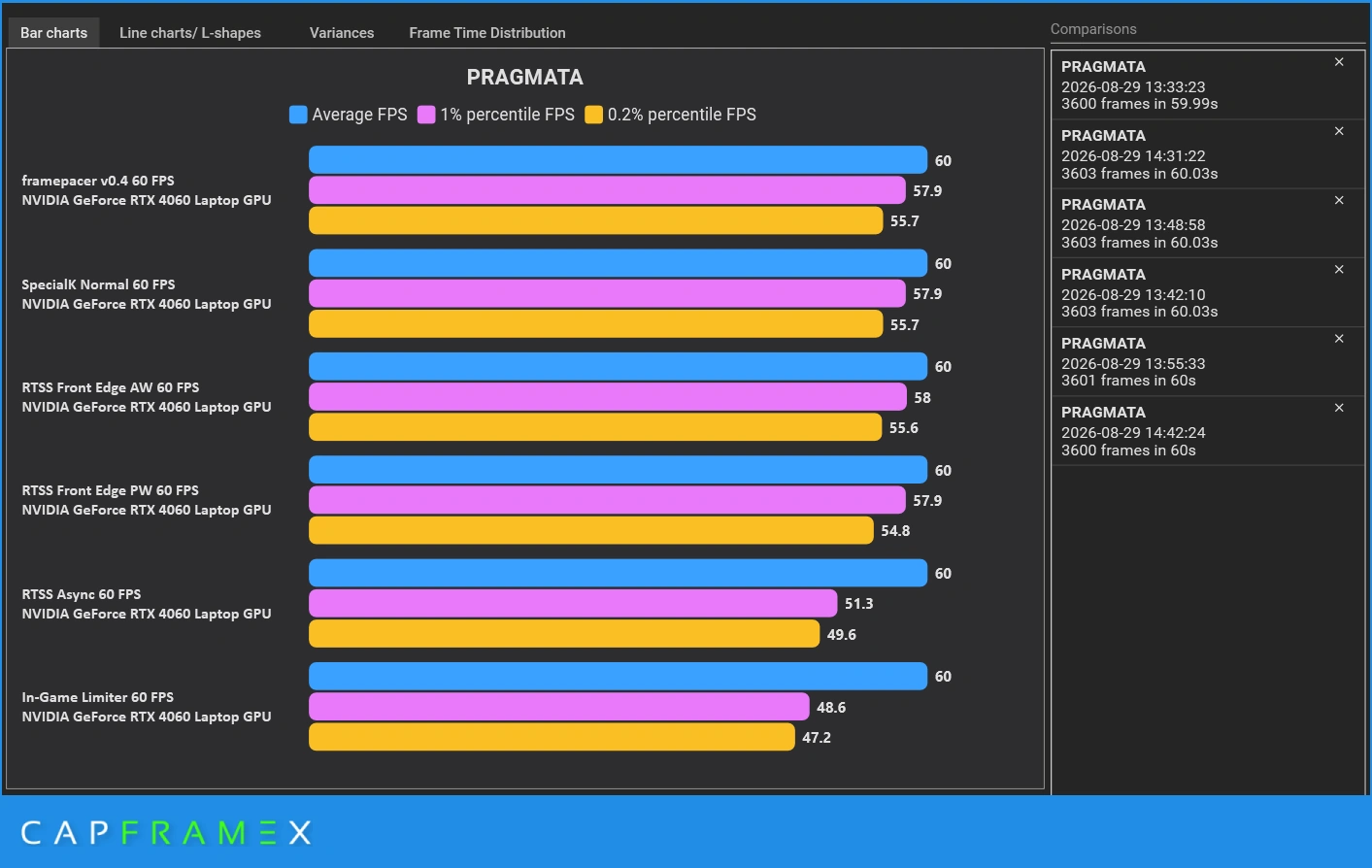
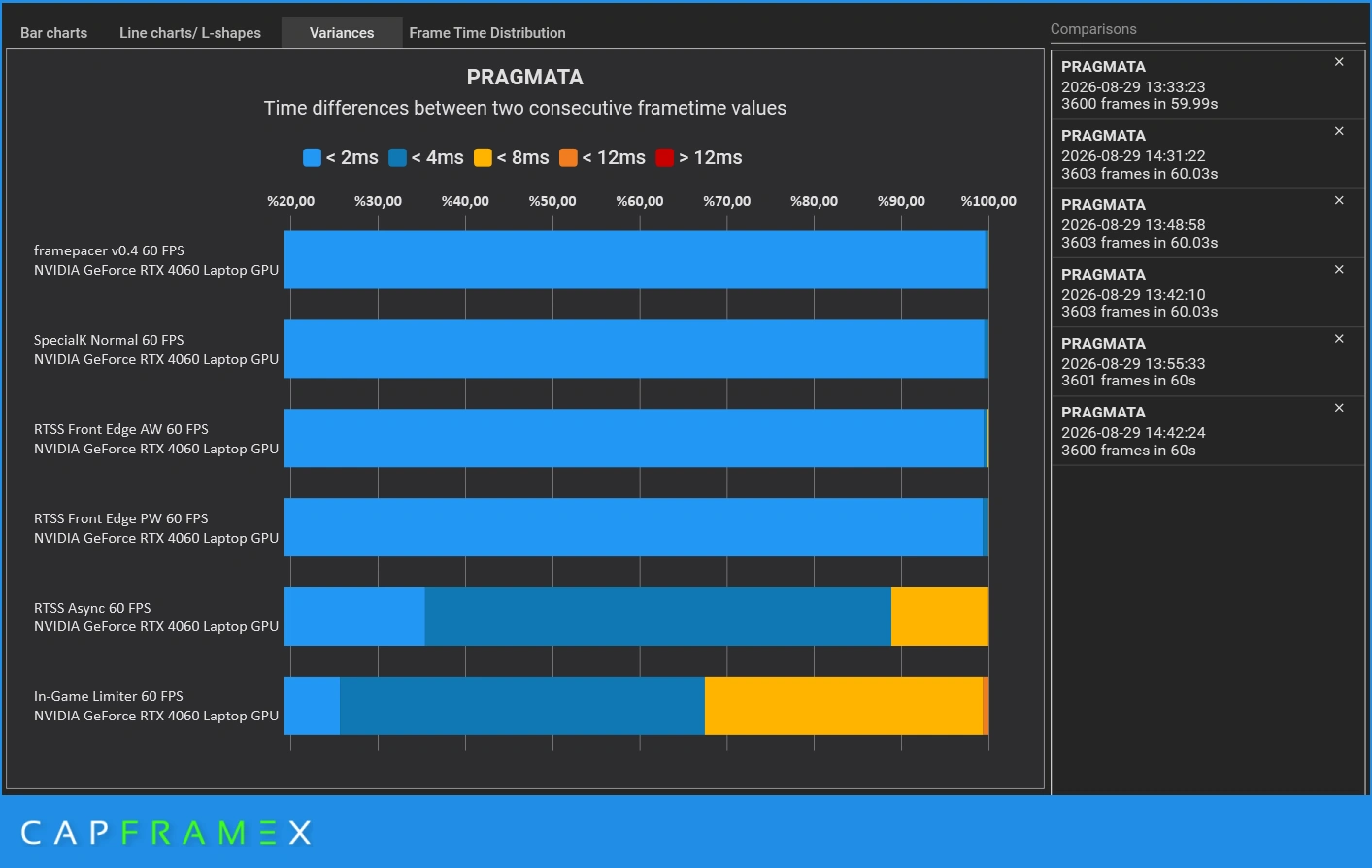
60 FPS Benchmark Results
| Limiter Method | Average FPS | 1% Low | 0.2% Low | Frames < 2ms Variance |
|---|---|---|---|---|
| framepacer v0.4 | 60.0 | 57.9 | 55.7 | 99.5% |
| Special K (Normal) | 60.0 | 57.9 | 55.7 | 99.4% |
| RTSS Front Edge (AW) | 60.0 | 58.0 | 55.6 | 99.1% |
| RTSS Front Edge (PW) | 60.0 | 57.9 | 54.8 | 99.2% |
| RTSS Async | 60.0 | 51.3 | 49.6 | 42.0% |
| In-Game Limiter | 60.0 | 48.6 | 47.2 | 24.0% |
Analysis & Findings
The 60 FPS test exposes a critical flaw in built-in game limiters:
- The In-Game Limiter Collapse: Only 24% of frames were delivered within 2ms of ideal timing. Over 75% of frames drifted by 4ms to 12ms. This causes the game to rapidly alternate between fast frames (12ms) and slow frames (24ms), producing persistent micro-stutter even though the overlay shows a constant 60 FPS.
- RTSS Async Degradation: In Async mode, only 42% of frames maintained tight < 2ms variance, with 0.2% lows dipping below 50 FPS.
- framepacer & Front Edge Stability: framepacer and RTSS Front Edge held 99.5% of all frames in the ultra-tight < 2ms bracket, maintaining a smooth frametime graph and strong 0.2% lows.
Test 3: 61 FPS - Odd Number Test
Gamers frequently set odd FPS caps (such as 61 FPS, 59 FPS, or 141 FPS on VRR displays) to stay within their VRR range, avoid input lag of V-Sync, or prevent LFC behavior.
We benchmarked the official NVIDIA App Driver Limiter against external tools at an odd 61 FPS limit to test driver-level pacing accuracy and non-standard cadence handling.
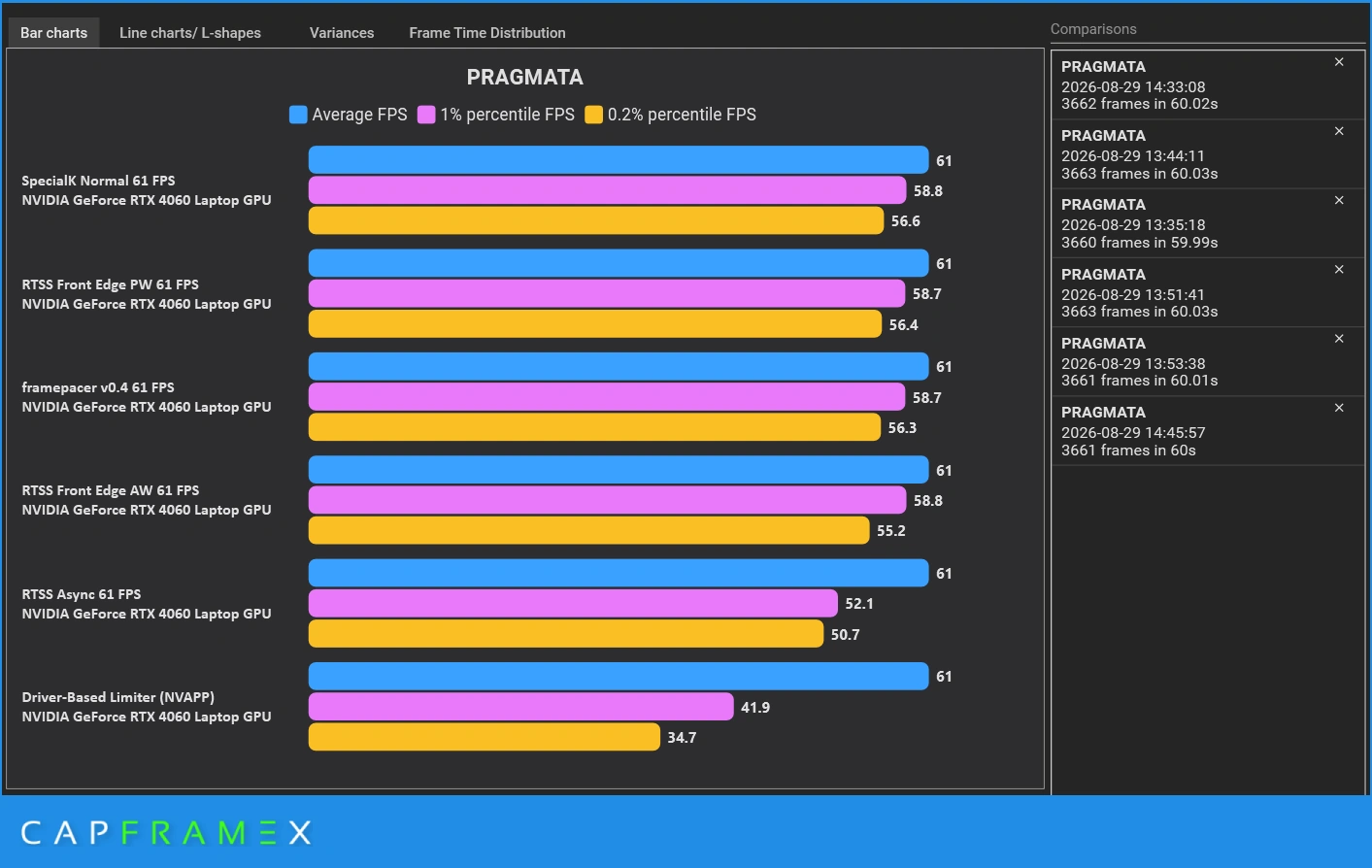
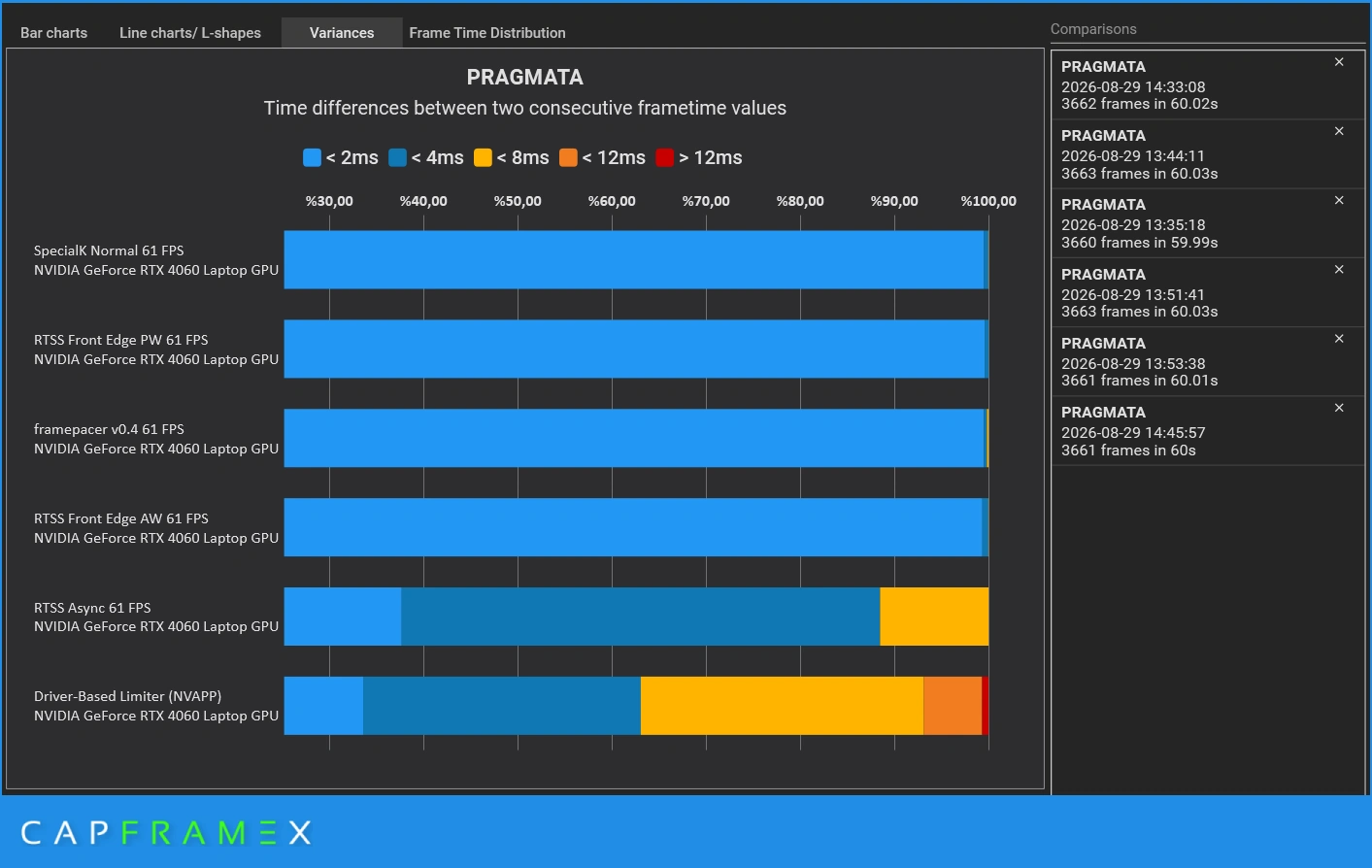
61 FPS Benchmark Results
| Limiter Method | Average FPS | 1% Low | 0.2% Low | Frames < 2ms Variance |
|---|---|---|---|---|
| Special K (Normal) | 61.0 | 58.8 | 56.6 | 99.4% |
| RTSS Front Edge (PW) | 61.0 | 58.7 | 56.4 | 99.3% |
| framepacer v0.4 | 61.0 | 58.7 | 56.3 | 99.1% |
| RTSS Front Edge (AW) | 61.0 | 58.8 | 55.2 | 99.2% |
| RTSS Async | 61.0 | 52.1 | 50.7 | 39.0% |
| Driver Limiter (NVIDIA App) | 61.0 | 41.9 | 34.7 | 26.0% |
Analysis & Findings
The 61 FPS test highlights how different limiters handle non-standard frame intervals:
- Special K, framepacer & RTSS Front Edge: These tools delivered near-perfect pacing, holding 99.1% to 99.4% of all frames within the ultra-tight < 2ms variance bracket. Their 0.2% lows remained consistently strong above 55–56 FPS.
- RTSS Async Drift: In Async mode, RTSS managed only 39% of frames under < 2ms variance, with 0.2% lows dipping to 50.7 FPS.
- The Driver Limiter Collapse: The NVIDIA App driver-based limiter showed severe frame pacing degradation. Only 26% of frames were within 2ms of the target, causing 1% lows to drop to 41.9 FPS and 0.2% lows to plunge to 34.7 FPS (a massive 43% drop below average FPS). Over 74% of frames suffered from noticeable jitter.
Why Do Limiters Perform So Differently?
Each limiter is built with a different goal in mind. Some are made for maximum smoothness, while others are made for minimum input lag:
RTSS Front Edge, framepacer & Special K
Focus: SmoothnessThese tools hold each frame until the exact moment it needs to appear on your screen. This creates a perfectly flat frametime line and eliminates stutters.
RTSS Async
Focus: Low Input LagLimits frames after they appear on screen to keep input lag at minimum, but allows frame timing to drift.
NVIDIA App Driver Limiter
Focus: Lowest Input LagWorks with NVIDIA Reflex to stop frame buildup for the lowest possible delay. However, it does not smooth out frame delivery, which causes stutter.
In-Game Limiters
Focus: ConvenienceBuilt directly into game menus, but rely on basic limiters that are not precise.
Summary: Which Limiter Should You Use?
| Tool / Limiter | Frame Pacing | 0.2% Low Stability | Setup Complexity | Best Use Case |
|---|---|---|---|---|
| framepacer | Excellent (99.5%+) | Very High | 1-Click Simple | Best for smooth, stutter-free gaming with one click. |
| RTSS (Front Edge Sync) | Excellent (99.2%+) | Very High | Hard | Excellent pacing, requires configuring. |
| Special K | Excellent (99.4%+) | Very High | Very Hard | Excellent pacing for advanced modders; steep learning curve. |
| RTSS (Async Default) | Moderate (40–73%) | Moderate | Medium | Default RTSS mode; acceptable but exhibits noticeable frametime drift. |
| In-Game Limiter | Poor (24–61%) |
Low | Easy | Convenient, but frequently suffers from stutter and frame jitter. |
| NVIDIA App Driver Cap | Poor (26%) |
Very Low (34.7 FPS) | Easy | Good for latency, but poor for frame pacing consistency. |
If your goal is eliminating stutters and achieving flat frametimes, relying on in-game or driver-level limiters is not enough. Using a high precision frame limiter like framepacer ensures that every single frame is delivered with exact millisecond precision to your screen.
Related Guides
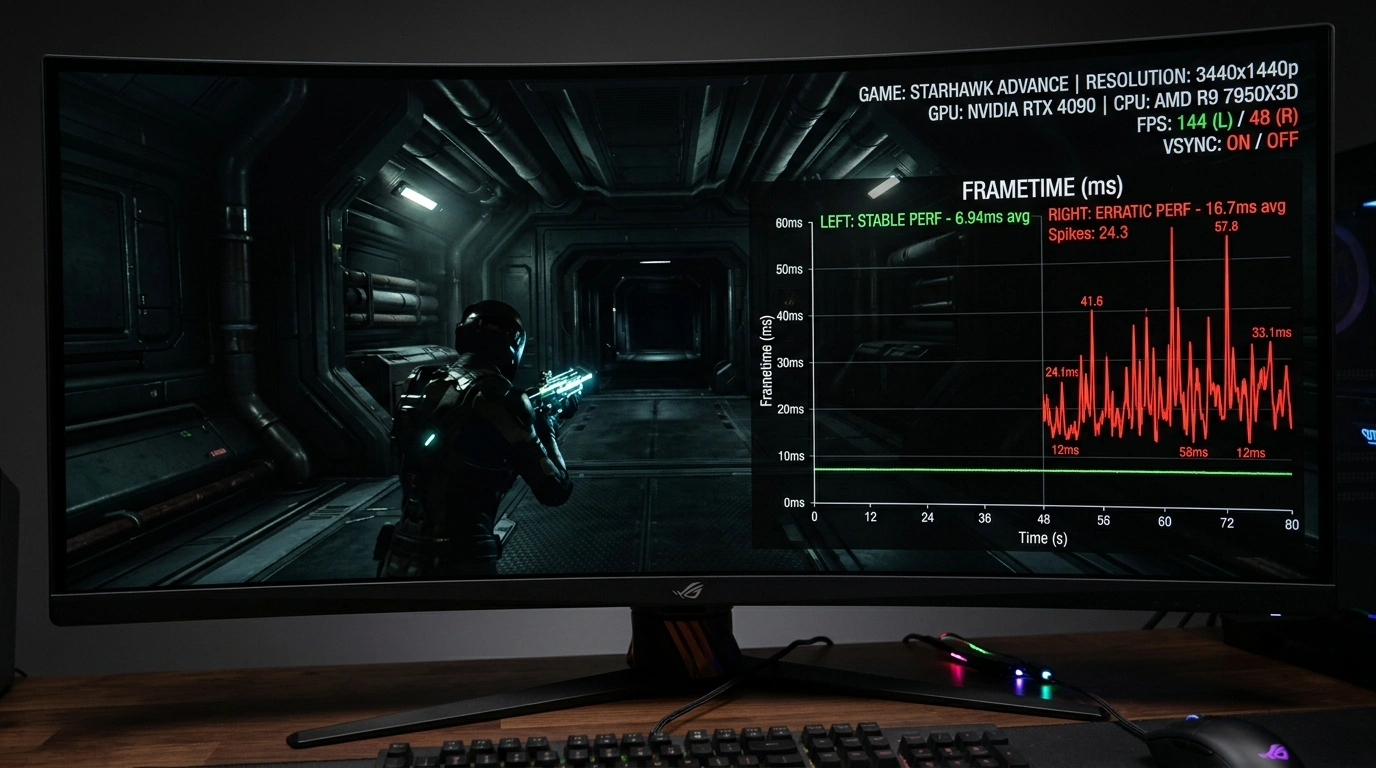
What is Frame Pacing? Why Games Stutter Even at High FPS
Understand why 120 FPS can still feel stuttery. Learn how good frame pacing fixes stutters and provides smooth gameplay.
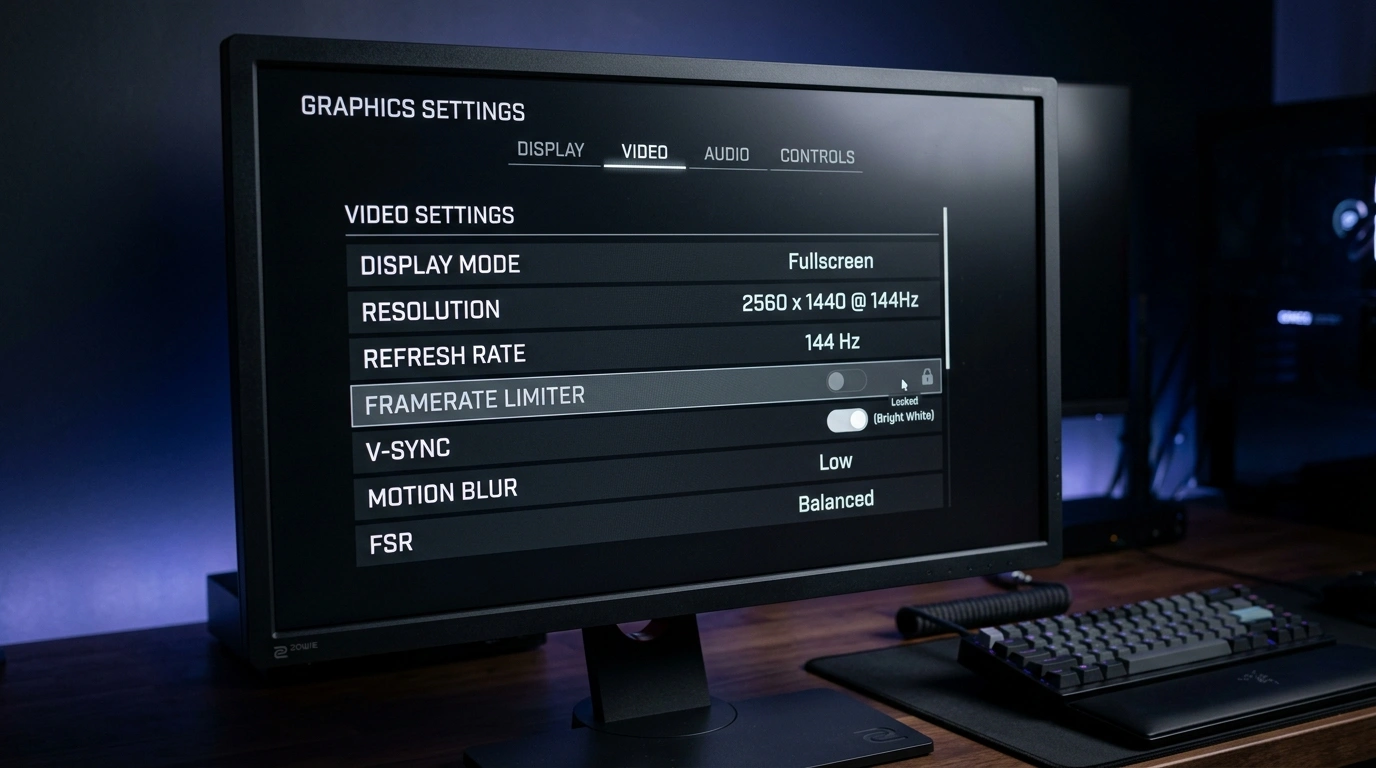
Best FPS Limiters: In-Game vs External Tools Compared
Compare the top 5 limiters: In-Game, GPU Driver, framepacer, RTSS, and Special K across frame pacing, input latency, ease of use.